
The Astra 19.2°E satellite position is one of the most important and widely used satellite locations in Europe. It carries a broad range of television, radio and other broadcast services for audiences across several European countries.
For viewers in Britain, receiving Astra 19.2°E requires accurate satellite dish alignment. A small mistake in the dish direction, elevation angle or LNB position can reduce signal quality and affect reception.
This complete guide explains the correct way to align a satellite dish to Astra 19.2°E in Britain and achieve a strong and stable signal.
Choose a Suitable Location for the Satellite Dish
The first step is selecting the correct location for your satellite dish.
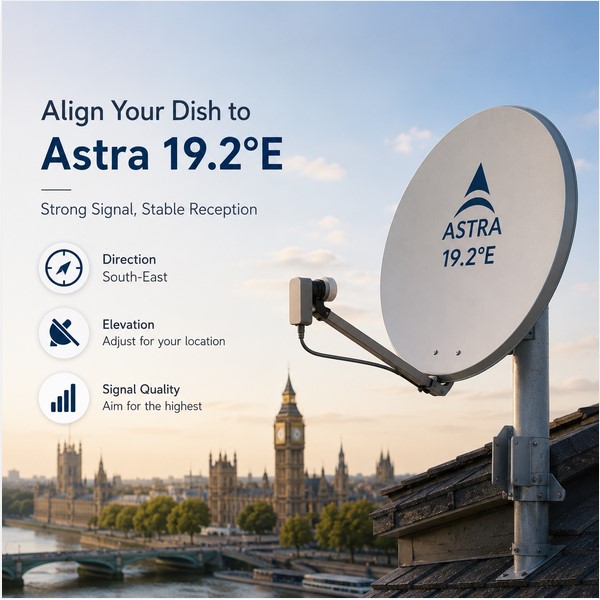
The dish needs a clear and unobstructed view toward the satellite. From Britain, Astra 19.2°E is generally located toward the south-east.
Before installing the dish, make sure that there are no obstacles in the signal path, including:
- Tall buildings.
- Trees and large branches.
- Chimneys.
- Walls.
- Roof structures.
- Nearby properties.
A satellite signal can be blocked even by obstacles that may appear small from the ground. Trees can also become a problem as they grow over time.
Make Sure the Mounting Pole Is Perfectly Vertical
The satellite dish mounting pole must be perfectly vertical.
This is an important part of achieving accurate alignment.
Use a spirit level to check the pole from different sides before adjusting the dish.
If the mounting pole is not vertical, the elevation markings on the dish bracket may not provide accurate results. This can make the alignment process much more difficult.
A properly installed mounting pole makes it easier to:
- Set the correct elevation.
- Find the satellite.
- Fine-tune the signal.
- Maintain a stable dish position.
Understand the Correct Direction for Astra 19.2°E
Although Astra 19.2°E is located east of the British Isles, a satellite dish should not simply point directly east.
From most locations in Britain, the dish generally needs to face toward the south-east.
The exact azimuth angle depends on your location.
For example, the correct direction will vary between:
- London.
- Birmingham.
- Manchester.
- Liverpool.
- Cardiff.
- Glasgow.
- Edinburgh.
- Belfast.
For the most accurate results, use a satellite alignment calculator or satellite finder application to obtain the exact azimuth for your location.
Set the Correct Elevation Angle
The elevation angle determines how high the dish should point above the horizon.
The correct elevation for Astra 19.2°E varies across Britain.
Viewers in southern England may use a higher elevation angle than viewers in Scotland or northern parts of the UK.
Start by setting the approximate elevation using the scale on the dish bracket.
Then:
- Loosen the elevation bolts slightly.
- Set the approximate elevation.
- Move the dish slowly upward or downward.
- Monitor the signal quality.
- Stop when the highest quality reading is reached.
Always make very small adjustments.
Configure the Satellite Receiver Correctly
Before searching for the satellite signal, check the receiver settings.
The basic configuration may include:
- Satellite: Astra 19.2°E
- LNB Type: Universal
- LNB Frequency: According to your LNB specifications.
- DiSEqC: Set correctly when using multiple LNBs.
If you are using more than one LNB, make sure Astra 19.2°E is assigned to the correct DiSEqC port.
Incorrect receiver settings can prevent successful reception even when the dish is accurately aligned.
Move the Dish Slowly from Left to Right
After setting the approximate direction and elevation, begin the signal search.
Move the dish slowly from left to right.
Make very small movements and pause for a few seconds after each adjustment.
Satellite receivers may not update the signal meter immediately. Moving too quickly can cause you to pass the satellite without noticing the signal.
When a signal appears:
- Stop moving the dish.
- Wait for the signal quality reading to stabilize.
- Make small adjustments.
- Find the position that provides the highest stable quality.
Focus on Signal Quality
Most satellite receivers display:
- Signal Strength
- Signal Quality
Signal strength alone does not always confirm that you have found the correct satellite.
A nearby satellite may also produce a strong reading.
For this reason, focus mainly on Signal Quality.
A high and stable quality reading is a better indication that the dish is correctly aligned and that the receiver is successfully decoding the satellite signal.
Adjust the LNB Skew
The LNB skew is the rotation angle of the LNB inside its holder.
The correct LNB position changes depending on your location in Britain.
After finding Astra 19.2°E:
- Loosen the LNB holder slightly.
- Rotate the LNB slowly.
- Monitor the signal quality.
- Stop at the best signal reading.
- Tighten the holder securely.
Small changes in LNB rotation can improve the signal quality and provide better stability.
Confirm That You Have Found Astra 19.2°E
After finding a strong signal, confirm that the dish is actually pointing at Astra 19.2°E.
You can do this by:
- Performing a channel scan.
- Checking the detected services.
- Confirming the satellite name on the receiver.
- Verifying a known active service or transponder.
This step is important because Astra 19.2°E is surrounded by other satellite positions that may be found accidentally during the alignment process.
Fine-Tune the Dish for the Strongest Signal
Once the signal appears, begin fine-tuning the dish.
Make small adjustments to:
- Horizontal direction.
- Elevation angle.
- LNB skew.
Change only one setting at a time and watch the signal quality.
The best dish position is the one that provides the highest stable signal quality.
If moving the dish in one direction reduces the signal, return to the previous position and make smaller adjustments in the opposite direction.
Tighten the Dish and Check the Signal Again
After reaching the best possible signal, tighten all bolts carefully.
Tighten them gradually because securing the bolts can slightly move the dish.
After tightening each bolt, check the signal quality again.
When all bolts are secure:
- Confirm that the signal remains stable.
- Check the cable connections.
- Confirm that the LNB is secure.
- Perform a channel scan.
- Test several services.
If the signal remains strong and stable, the alignment has been completed successfully.
Common Problems When Aligning Astra 19.2°E
No Signal
If the receiver shows no signal:
- Check the satellite cable.
- Inspect the LNB.
- Make sure the mounting pole is vertical.
- Recheck the dish direction.
- Check the elevation angle.
- Confirm the receiver settings.
- Make sure there are no obstacles blocking the dish.
Strong Signal but the Wrong Channels
A strong signal with unexpected channels may mean that the dish is pointing at another satellite.
Perform a channel scan and verify the detected services.
Continue making small adjustments if necessary.
Weak or Unstable Signal
Weak reception may be caused by:
- Slightly incorrect dish alignment.
- Incorrect LNB skew.
- Poor-quality cable.
- Loose connectors.
- A damaged LNB.
- An obstacle in the signal path.
- Difficult weather conditions.
Fine-tuning the dish and LNB can often improve reception significantly.
Can Astra 19.2°E Be Combined with Another Satellite?
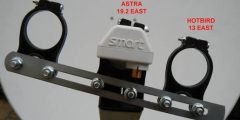
Yes, Astra 19.2°E can be received with other nearby satellite positions using multiple LNBs on one dish.
A popular combination in Europe is:
- Astra 19.2°E
- Hot Bird 13°E
Because the orbital distance between these two positions is relatively small, they can be combined in some multi-LNB installations.
The success of the installation depends on:
- Dish size.
- Your location.
- Accurate dish alignment.
- LNB holder design.
- Signal strength.
- DiSEqC settings.
For best results, accurately align the main satellite before adding additional LNBs.
Can Weather Affect Astra 19.2°E Reception?
Heavy rain, snow and strong winds can affect satellite reception.
A perfectly aligned dish provides a better signal margin, which can help maintain stable reception during difficult weather conditions.
If the dish is only receiving a weak signal, bad weather may cause picture freezing, break-up or temporary signal loss.
This is why achieving the highest possible signal quality during installation is important.
Tips for a Strong and Stable Astra 19.2°E Signal
For the best reception:
- Choose a location with a clear line of sight.
- Make sure the mounting pole is perfectly vertical.
- Use a good-quality LNB.
- Use high-quality satellite cable.
- Protect outdoor cable connections from water.
- Avoid unnecessary cable joins.
- Make small adjustments during alignment.
- Focus on signal quality.
- Adjust the LNB skew carefully.
- Recheck the signal after tightening the dish.