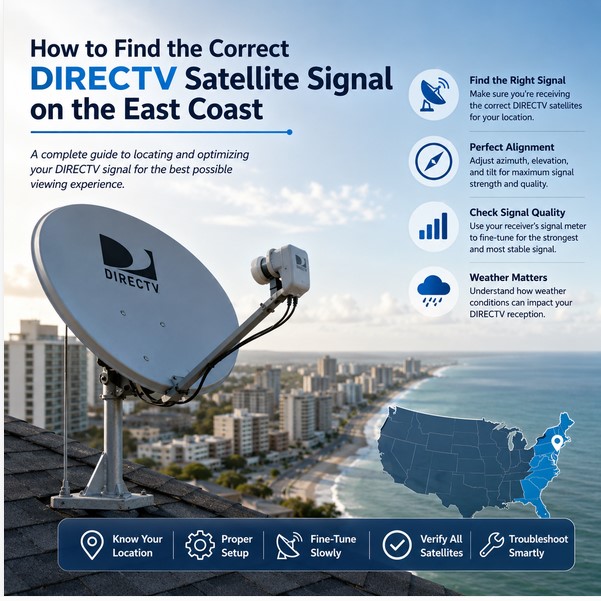

Finding the correct DIRECTV satellite signal on the East Coast is essential for clear, reliable television reception. Many viewers assume that dish alignment works the same way everywhere in the United States. In practice, geographical location changes the required pointing angles. Installations in New York, Florida, or the Carolinas often need different azimuth, elevation, and tilt settings than those used farther west. Proper alignment ensures the dish receives all the satellites required by the service and equipment. This guide explains how to locate and optimize the DIRECTV signal specifically for East Coast locations.
Understanding DIRECTV Satellite Reception
DIRECTV delivers programming from multiple satellites in geostationary orbit. Depending on the receiver model, dish type, and subscribed packages, the system may need signals from more than one orbital position. A multi-satellite dish collects these signals through carefully aimed reflectors and LNBs. If any required satellite is missing or weak, certain channels may pixelate, freeze, or disappear. Correct reception begins with confirming the equipment and the satellites it expects to see.
Why Satellite Position Matters
The satellites remain fixed relative to Earth, yet the viewer’s position on the ground changes the line of sight. Latitude and longitude determine the exact horizontal direction, vertical angle, and dish tilt needed for strong reception. Even modest differences in location produce measurable changes in alignment values. Using settings from another region frequently results in incomplete or unstable signals.
Why East Coast Locations Are Different
Viewers along the East Coast sit farther east than those in the Midwest or West. This eastward position alters the azimuth and can influence elevation and tilt. Cities and states such as New York, New Jersey, Pennsylvania, Washington D.C., Virginia, North Carolina, South Carolina, and Florida each require location-specific calculations. Exact values depend on the user’s ZIP code, city, and precise installation site. No single set of angles serves every East Coast address.
How to Find the Correct DIRECTV Satellite Signal
Checking the DIRECTV Receiver or Equipment Model
Begin by identifying the receiver model and any external multi-switch or SWM equipment. Different generations and dish types expect signals from specific satellite combinations. The receiver’s on-screen menu or the equipment label usually provides this information.
Identifying the Correct DIRECTV Dish
Confirm whether the installation uses a single-satellite or multi-satellite dish. Multi-satellite dishes require accurate tilt in addition to azimuth and elevation. Using the wrong dish type or an improperly configured one prevents full signal acquisition.
Understanding the Satellite Positions Required by the Service
Modern DIRECTV systems typically need several orbital positions to deliver the complete channel lineup. The receiver’s satellite setup menu lists the satellites it is programmed to receive. Confirm that the dish is capable of collecting all of them.
Checking the Receiver’s Satellite Setup Menu
Access the signal strength and quality screens through the receiver menu. These screens display individual satellite readings and help verify which signals are present and how strong they are.
Using Signal Strength Information
Signal strength meters give a useful starting indication, yet they do not tell the full story. Strength alone can appear acceptable while quality remains poor.
Understanding the Difference Between Signal Strength and Signal Quality
Signal strength measures power. Signal quality measures how clean and usable the data is. High quality is more important for stable viewing. Always prioritize quality when fine-tuning.
Confirming That All Required Satellites Are Being Received
After initial acquisition, check every satellite listed in the setup menu. Partial reception often produces missing channels or intermittent problems on specific packages.
Understanding Azimuth, Elevation, and Tilt
What Is Azimuth?
Azimuth is the horizontal compass direction the dish faces. It is measured in degrees from true north and tells the installer how far left or right to turn the dish.
What Is Elevation?
Elevation is the vertical angle of the dish above the horizon. It raises or lowers the dish face so the reflector points at the correct height in the sky.
What Is Dish Tilt or Skew?
Tilt (sometimes called skew) rotates the entire multi-satellite dish assembly. Proper tilt aligns the LNBs with the arc of satellites the system must receive. Incorrect tilt is a common cause of missing satellites even when one signal looks strong.
DIRECTV Signal Alignment on the East Coast
Alignment values change across East Coast states because of differences in latitude and longitude. Settings appropriate for New York differ from those needed in Florida or the Carolinas. Within each state, coastal cities can vary from inland locations. Always calculate values for the exact ZIP code and installation site rather than copying a neighbor’s or another city’s numbers.
Step-by-Step Guide to Finding the Signal
Step 1: Check Your Installation Location
Choose a site with a clear view of the southern sky. Trees, buildings, chimneys, and other structures can block or weaken the signal path. A clear line of sight is the foundation of reliable reception.
Step 2: Make Sure the Mount Is Level
The mounting pole must be perfectly vertical. A tilted pole introduces permanent error that later adjustments cannot fully correct. Use a level before attaching the dish.
Step 3: Enter Your Location Information
Enter the installation ZIP code into a reliable satellite alignment calculator or the receiver’s setup menu when available. The resulting azimuth, elevation, and tilt values provide an accurate starting point.
Step 4: Set the Approximate Azimuth, Elevation, and Tilt
Apply the calculated values as closely as possible. Use a compass for azimuth (correcting for magnetic declination if necessary), an inclinometer or the dish scale for elevation, and the dish’s tilt scale for multi-satellite assemblies.
Step 5: Slowly Search for the Strongest Signal
Move the dish in very small increments while watching the receiver’s signal meters. Search both horizontally and vertically around the calculated point. Patience prevents overshooting the peak.
Step 6: Fine-Tune the Dish
Once a usable signal appears, make finer adjustments to maximize quality on all required satellites. Tighten bolts gradually and recheck the meters after each tightening step to ensure the dish has not shifted.
Step 7: Verify All Required Satellite Signals
Confirm that every satellite listed in the receiver menu shows acceptable quality. Only then consider the alignment complete.
Common Problems When Searching for DIRECTV Signals
No signal after installation often results from an obstructed view, incorrect angles, or a non-vertical mount. Weak signal on some satellites frequently points to improper tilt. Receiving only part of the required satellites usually means the dish is aimed at one orbital position but missing others. Trees, incorrect receiver settings, loose or damaged coaxial cables, water intrusion, corrosion, and wind-induced dish movement are additional common causes. Using alignment values from another city or state almost always produces incomplete results.
How Weather Can Affect DIRECTV Reception
Heavy rain, thunderstorms, wet snow, and strong wind can temporarily weaken or interrupt satellite signals. This rain fade is normal and usually clears when the weather improves. Persistent problems after storms often indicate water in connectors or a shifted dish rather than ongoing weather effects.
How to Improve DIRECTV Signal Reception
Accurate dish alignment is the most effective improvement. Ensure all cable connections are tight and weather-sealed. Confirm the mount remains stable and the line of sight stays clear. Inspect LNBs and replace any that show physical damage or moisture. Periodically check cables and connectors for corrosion or wear. Small improvements in each area compound into noticeably better overall performance.
Frequently Asked Questions
Which DIRECTV Satellite Should I Receive on the East Coast?
The exact satellites depend on the receiver model, dish type, and subscribed service. Check the receiver’s satellite setup menu for the list required by the equipment.
Does the DIRECTV Dish Direction Change Between East Coast States?
Yes. Differences in latitude and longitude produce different azimuth, elevation, and tilt values from state to state and even between nearby cities.
Do I Need to Point My DIRECTV Dish in the Same Direction as My Neighbor?
Not necessarily. Even short distances or different mounting heights can require slightly different settings. Always use location-specific calculations.
How Can I Find the Correct DIRECTV Satellite Signal?
Use a ZIP-code-based alignment calculator, set approximate angles, then slowly peak the signal while monitoring quality on the receiver.
Why Is My DIRECTV Signal Strong on One Satellite but Weak on Another?
This usually indicates incorrect dish tilt or a slight misalignment that favors one orbital position over the others.
Does My ZIP Code Affect DIRECTV Dish Alignment?
Yes. ZIP code provides the precise latitude and longitude needed for accurate azimuth, elevation, and tilt calculations.
Can Trees Block the DIRECTV Satellite Signal?
Yes. Even partial obstruction from leaves or branches can degrade or eliminate the signal, especially in wet or windy conditions.
Why Does My DIRECTV Signal Disappear During Heavy Rain?
Heavy moisture in the atmosphere attenuates the satellite signal. This temporary rain fade normally recovers once the precipitation ends.
How Can I Improve a Weak DIRECTV Satellite Signal?
Recheck alignment and tilt, verify a clear line of sight, inspect and reseal all cable connections, ensure the mount is stable, and confirm the LNBs are functioning correctly.