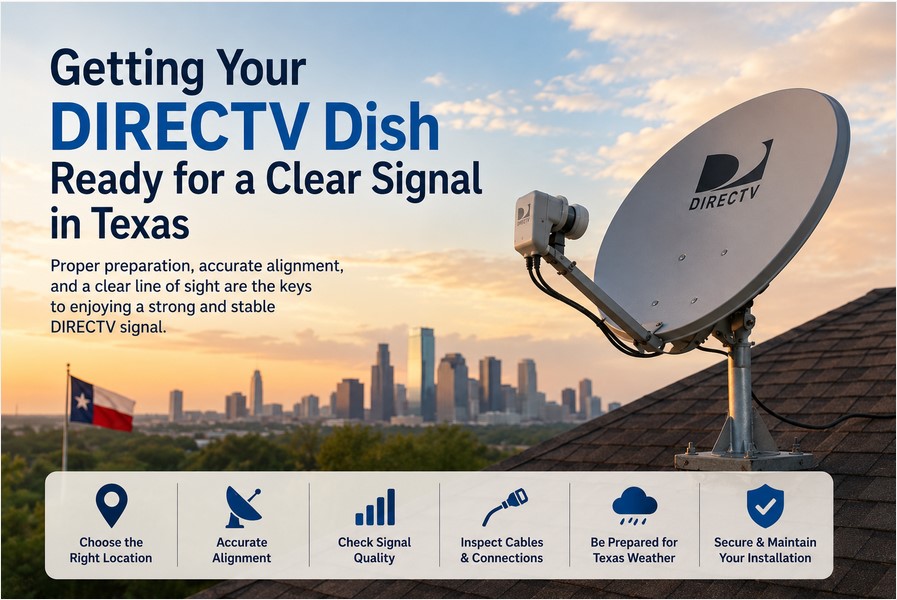

Preparing a DIRECTV dish correctly is the foundation of reliable satellite television reception across Texas. Because the state covers a vast geographic area, alignment needs change from one location to another. Viewers in Dallas face different requirements than those in Houston, Austin, San Antonio, El Paso, or smaller communities. Latitude, longitude, local terrain, nearby structures, and the exact mounting position all influence the final settings. A dish that performs well in one city can deliver weak or incomplete signals only a few hundred miles away if the angles are simply copied. Taking time to inspect equipment, establish a clear line of sight, set a perfectly vertical mast, and apply location-specific values produces the stable picture quality Texas households expect. This guide walks through every practical step needed to get a DIRECTV dish ready for a clear signal.
Understanding DIRECTV Dish Reception in Texas
DIRECTV satellite reception depends on a complete chain of components working together. The dish reflects signals from multiple orbital positions toward the LNB assembly. The LNB converts those signals and sends them through coaxial cable to the receiver. The receiver then processes the data and delivers channels to the television. Any weak link—bent dish surface, loose mount, damaged cable, water-filled connector, or obstructed view—reduces overall performance. In Texas the combination of strong summer sun, occasional severe storms, and large distances between cities makes careful preparation especially important. Proper setup before any fine-tuning begins prevents repeated trips up the ladder and long periods of missing channels.
Why Location Matters
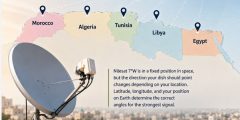
Exact location inside Texas determines the precise viewing angle toward the satellites. Cities such as Dallas, Houston, Austin, San Antonio, and El Paso sit at different latitudes and longitudes, so the required azimuth, elevation, and tilt shift accordingly. Even within the same metropolitan area, a home on the north side of town may need slightly different numbers than one on the south side. Using alignment values taken from a neighbor in another city almost always leaves one or more satellites under-performing. The reliable approach is to calculate settings for the specific ZIP code and mounting coordinates rather than relying on generalized Texas recommendations.
Understanding the Southern Sky
Before any hardware is attached, the installer must confirm a clear path toward the southern sky. DIRECTV satellites appear in the southern portion of the sky from every Texas location. Tall buildings, mature trees, chimneys, roof peaks, water tanks, and neighboring structures can block or partially obstruct that path. Seasonal leaf growth often turns a clear winter view into a blocked summer one. Walking the property and looking south at different times of day reveals potential obstacles that will later cause pixelation or complete signal loss. Choosing a mounting spot with an unobstructed southern exposure is one of the most effective ways to ensure long-term reliability.
Preparing the DIRECTV Dish Before Installation
Thorough preparation of every component before climbing onto a roof or ladder saves time and prevents frustration later. Inspecting the dish, confirming the strength of the mounting surface, verifying that the mast will stand perfectly vertical, and checking every cable and connector create a solid foundation. Rushing past these steps frequently leads to weak signals that appear only after the dish has been fully assembled and partially aligned. Taking a methodical approach at the beginning produces cleaner results and fewer callbacks.
Checking the Dish and Mount
Examine the dish reflector for dents, warping, or corrosion that could distort the reflected signal. Check every bolt, bracket, and arm for tightness and signs of metal fatigue. The mounting location itself must be structurally sound and capable of resisting the strong winds common across much of Texas. A loose or flexible mount allows the dish to shift during storms, destroying careful alignment. Selecting a solid surface and using appropriate lag bolts or masonry anchors keeps the entire assembly stable for years.
Installing a Perfectly Vertical Mast
The mast must stand exactly vertical before the dish is attached. Even a few degrees of lean throws off the calculated azimuth, elevation, and tilt values. Use a quality level on two adjacent sides of the pole and adjust the mounting hardware until the bubble sits perfectly centered. A tilted mast forces the installer to compensate during fine-tuning, often resulting in compromised signal quality on one or more satellites. Spending extra minutes leveling the mast at the start eliminates a common source of later problems.
Checking Cables and Connectors
Inspect every coaxial cable for cuts, crushed sections, or UV damage. Look at outdoor connectors for corrosion, bent center pins, or missing weather boots. Moisture that enters a connector can create intermittent dropouts that are difficult to diagnose. Replace any questionable cable or connector before installation begins. Properly weather-sealed connections protect the signal path from the intense heat, humidity, and occasional heavy rain that Texas installations routinely experience.
Understanding Azimuth, Elevation, and Tilt
Successful DIRECTV dish alignment in Texas rests on three interdependent adjustments. Understanding what each one controls helps the installer interpret the receiver’s signal meters and make purposeful rather than random movements. Azimuth sets the left-right direction, elevation sets the up-down angle, and tilt rotates the multi-satellite assembly so every required orbital position falls within the LNB’s field of view. Getting all three approximately correct before fine-tuning dramatically shortens the search for a usable signal.
What Is Azimuth?
Azimuth is the horizontal compass direction the dish faces. Measured in degrees from true north, it tells the installer how far to swing the dish left or right. Because Texas spans a wide range of longitudes, azimuth values differ noticeably between eastern and western parts of the state. Using a compass that accounts for magnetic declination and verifying the reading against a calculated value prevents large initial pointing errors.
What Is Elevation?
Elevation is the vertical angle of the dish face above the horizon. It raises or lowers the reflector so the focal point aims at the correct height in the southern sky. Latitude primarily determines elevation; locations farther north generally require lower angles. Setting elevation first with the aid of an inclinometer or the scale on the dish bracket provides a stable starting height for the subsequent azimuth search.
What Is Dish Tilt or Skew?
Tilt, sometimes called skew, rotates the entire multi-satellite dish around its central axis. Proper tilt aligns the multiple LNBs with the arc of satellites the system must receive. Incorrect tilt is a frequent reason one satellite shows strong quality while others remain weak or missing. Multi-satellite dishes include a tilt scale; matching that scale to the calculated value for the installation ZIP code is essential for complete channel reception.
Step-by-Step Guide to Getting a Clear DIRECTV Signal
A methodical sequence turns the preparation work into a successful installation. Following each step in order reduces the chance of overlooking a critical detail and produces a stable signal with the least amount of trial and error.
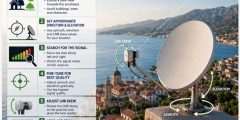
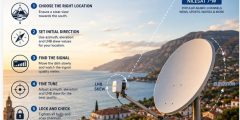
Step 1: Choose the Best Installation Location
Select a mounting point that offers a clear southern view, structural strength, and reasonable access for future maintenance. Avoid locations where future tree growth or new construction is likely to obstruct the path. Confirm that the chosen surface can support the weight of the dish and resist wind loads common in the region.
Step 2: Use Location-Specific Alignment Settings
Enter the exact ZIP code into a reliable satellite alignment tool or the receiver’s setup menu. The resulting azimuth, elevation, and tilt numbers become the starting targets. These calculated values are far more accurate than any statewide average and give the installer a realistic search window.
Step 3: Set the Initial Azimuth, Elevation, and Tilt
Apply the calculated numbers as closely as possible using a compass, level, and the scales provided on the dish hardware. The goal at this stage is approximation rather than perfection. Getting within a few degrees of each target places the dish close enough that a usable signal usually appears with only minor subsequent movement.
Step 4: Search for the Signal Slowly
Move the dish in very small increments while watching the receiver’s signal meters. Large swings easily pass over the peak. Horizontal sweeps at a fixed elevation followed by small vertical adjustments form an efficient search pattern. Patience during this phase consistently outperforms hurried motion.
Step 5: Monitor Signal Quality
Prioritize signal quality readings over raw strength numbers. Quality indicates how clean and usable the data stream is. Continue micro-adjustments until quality reaches the highest stable level on every required satellite. Strength can look acceptable while quality remains marginal, leading to later pixelation.
Step 6: Verify All Required Satellite Signals
Open the receiver’s satellite signal screen and confirm that every listed satellite shows acceptable quality. Partial reception often produces missing channels or package-specific problems. Only when all required signals meet the quality threshold should the installer proceed to final tightening.
Step 7: Secure the Final Position
Tighten each bolt a little at a time, alternating between them to avoid shifting the dish. Recheck the signal meters after every few turns. Once the hardware is fully secured and the meters remain stable, the mechanical portion of the installation is complete.
Common DIRECTV Dish Problems in Texas
Even carefully prepared installations can encounter issues unique to Texas conditions. Recognizing the most frequent causes speeds diagnosis and restoration of service.
Trees and Seasonal Growth
Mature trees and rapid seasonal leaf growth are leading causes of gradual signal degradation. A path that was clear in winter can become partially blocked by summer foliage. Regular visual checks of the southern skyline help identify developing obstructions before they cause noticeable problems.
Severe Weather
Thunderstorms, heavy rain, and hail are common across much of Texas. Intense precipitation can temporarily attenuate the satellite signal, a phenomenon known as rain fade. Once the storm passes, reception normally returns. Persistent loss after the weather clears usually points to water in connectors or a dish that shifted under wind load.
Wind Movement
Strong winds can move a poorly secured dish by only a fraction of a degree, yet that small change is enough to drop quality on one or more satellites. Ensuring the mount is rigid and all hardware is tight minimizes this risk.
Incorrect Alignment Values
Copying azimuth, elevation, or tilt numbers from another Texas city is a frequent source of incomplete reception. Because the state is large, values that work in Houston rarely match those needed in El Paso or Amarillo. Always recalculate for the exact installation ZIP code.
Damaged Equipment
Sun exposure, temperature extremes, and occasional severe weather can degrade cables, connectors, and LNB assemblies over time. Visual inspection after major storms and periodic cable checks catch these problems early.
How to Improve DIRECTV Signal Stability
Long-term stability comes from ongoing attention rather than a single perfect alignment. Keep the dish securely mounted and free of debris. Maintain a clear line of sight by trimming vegetation as needed. Inspect outdoor cables and connectors at least twice a year and reseal any that show wear. After major storms, verify that the dish has not shifted and that signal quality remains high. Avoid unnecessary readjustments once the system is performing well. When problems appear, first check receiver settings and cable continuity before assuming the dish itself needs realignment. These simple habits extend the life of a properly prepared installation.
Frequently Asked Questions
Many Texas viewers encounter similar questions when preparing or troubleshooting a DIRECTV dish. The answers below address the most common concerns with practical detail.
Does DIRECTV Dish Direction Change Between Texas Cities?
Yes. Because Texas spans a wide range of latitudes and longitudes, the required azimuth, elevation, and tilt change from one city to another. Settings that produce excellent results in Dallas will not automatically work in Houston, Austin, San Antonio, or El Paso. Calculating values for the specific ZIP code is the only reliable method.
What Is the Best Direction for a DIRECTV Dish in Texas?
The dish should face the southern sky, with the exact compass heading determined by the installation’s longitude. No single direction serves the entire state. Using a location-specific calculation provides the correct starting azimuth for each site.
Why Does My DIRECTV Signal Keep Dropping?
Intermittent dropouts often result from partial tree obstruction, moisture in outdoor connectors, a dish that has shifted in the wind, or cables that have degraded under Texas sun and heat. Checking the line of sight, resealing connectors, and verifying mount stability resolve most recurring problems.
Can Trees Block My DIRECTV Signal?
Yes. Even partial blockage by leaves or branches can degrade or eliminate the signal, especially during wet or windy conditions. Maintaining a clear southern path is essential for consistent reception.
How Does Texas Weather Affect Satellite Reception?
Heavy rain and thunderstorms can cause temporary rain fade. Strong winds may move an inadequately secured dish. Once the weather clears and the hardware is confirmed stable, normal reception usually returns. Persistent issues after storms indicate the need for physical inspection.
Why Is My DIRECTV Signal Weak After Strong Winds?
Wind can shift a dish by a fraction of a degree or loosen mounting hardware. Rechecking the signal meters and retightening bolts while monitoring quality restores performance in most cases.
Do I Need Different Alignment Settings for Different Texas Cities?
Yes. Each city and even different ZIP codes within the same metro area require their own calculated azimuth, elevation, and tilt values. Copying settings from another location almost always produces incomplete satellite reception.
How Can I Improve DIRECTV Signal Quality?
Start with accurate location-specific alignment, a perfectly vertical mast, and a clear line of sight. Use high-quality weather-sealed cables and connectors. After initial setup, fine-tune for maximum quality rather than maximum strength, and periodically inspect the installation for weather-related changes.